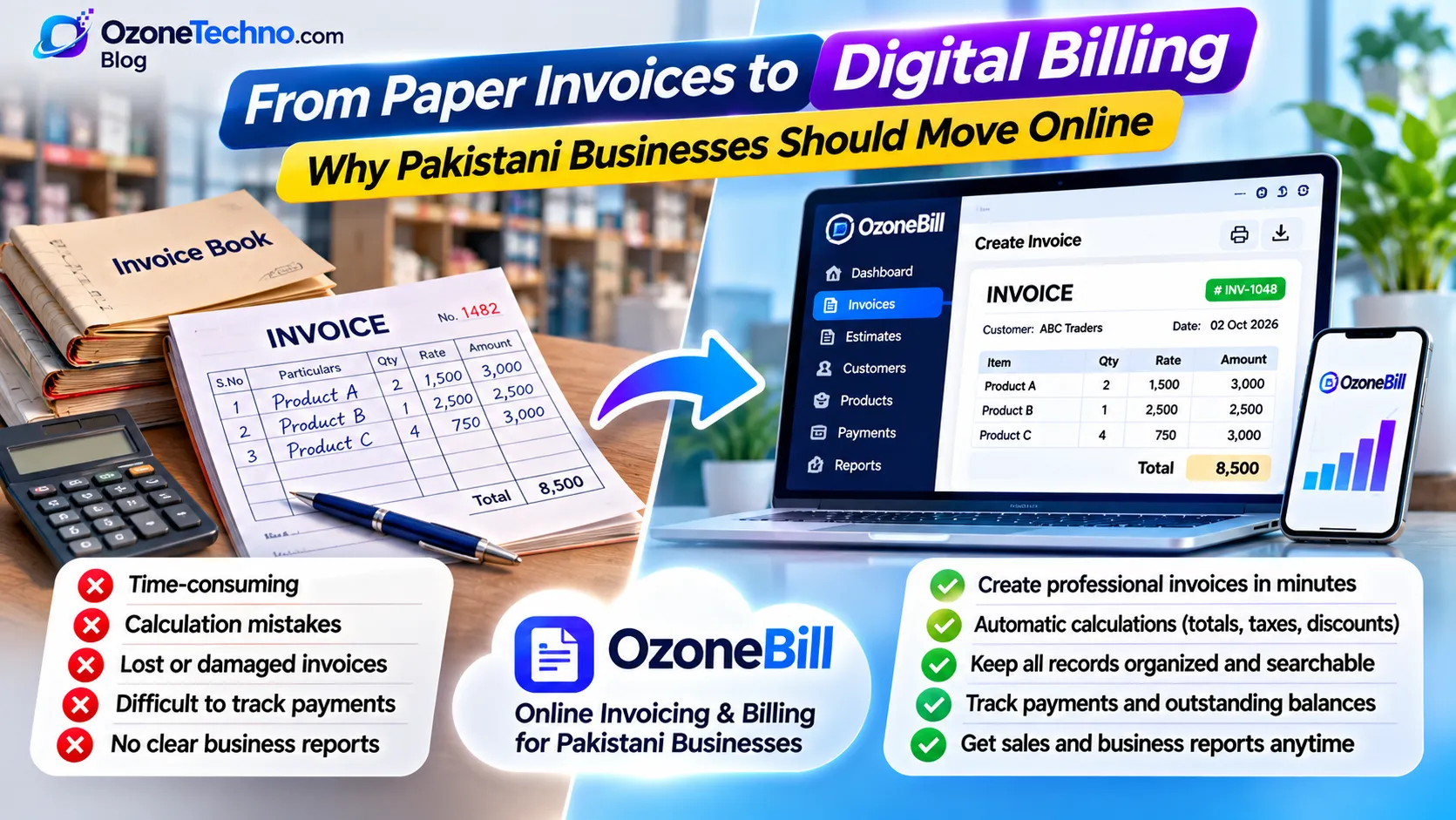
From Paper Invoices to Digital Billing: Why Pakistani Businesses Should Move Online
For decades, many businesses in Pakistan have managed their daily sales using handwritten invoices, printed bill books, carbon-copy receipts, and paper registers. From small retail shops and wholesalers to distributors, service providers, and growing companies, paper-based billing is still a familiar part of everyday business.
But business is changing.
Customers expect faster service, business owners want better records, and managing sales through piles of paper is becoming increasingly difficult. With affordable internet access and easy-to-use online tools, businesses no longer need to depend entirely on traditional billing methods.
Moving from paper invoices to digital billing is one of the simplest steps a Pakistani business can take towards becoming more organized and efficient.
Let's explore why this change matters and how businesses can get started.
1. The Traditional Paper Invoice Problem
Imagine a shop owner who prepares 30 to 50 invoices every day.
Each invoice is written by hand or filled out in a printed bill book. At the end of the day, the owner has a collection of paper records. At the end of the month, finding a particular customer's bill or calculating total sales can become a time-consuming task.
This is a familiar situation for many small and medium-sized businesses.
Some common problems with paper-based billing include:
Manual work: Writing customer details, product descriptions, quantities, and prices repeatedly takes time.
Calculation mistakes: Manual calculations can result in incorrect totals, discounts, or outstanding balances.
Lost invoices: Paper bills can be misplaced, damaged, or difficult to retrieve.
Difficult record keeping: Finding old invoices and checking previous transactions can take considerable effort.
Limited sales visibility: Owners may not have an accurate picture of daily, weekly, or monthly sales without manually reviewing records.
Sharing difficulties: Sending a physical invoice to a customer who is not present can be inconvenient.
Paper invoices may have worked well for years, but businesses now have easier ways to manage these tasks.
2. What Is Digital Invoicing?
Digital invoicing means creating, managing, and storing business invoices using software instead of preparing every bill manually.
Rather than writing an invoice in a paper register, a business owner can enter the customer's details, add products or services, enter quantities and prices, and generate a professional invoice.
Depending on the software, the invoice can then be downloaded, printed, or shared with the customer digitally.
A digital invoicing system can help businesses:
Create professional invoices in minutes.
Automatically calculate totals and applicable discounts.
Maintain customer records.
Store previous invoices in one place.
Track paid and unpaid invoices.
Generate estimates and quotations.
Review sales records and billing history.
Access business records from an internet-connected device.
The important point is that digital billing does not require a business to change everything overnight. A business can start by replacing its handwritten invoices while continuing its normal daily operations.
3. Why Pakistani Businesses Should Move Towards Online Billing
For Pakistani shopkeepers, traders, wholesalers, distributors, freelancers, and service providers, online invoicing can offer practical advantages.
Save Time on Daily Billing
Instead of repeatedly writing the same business information, customer details, and product descriptions, businesses can create invoices using a digital system.
Frequently sold products and services can be saved for quicker selection, reducing repetitive work.
Reduce Manual Calculation Errors
A digital invoice generator can calculate quantities, prices, discounts, and totals automatically.
This reduces the need to calculate every invoice manually and helps businesses prepare more consistent bills.
Keep All Invoices Organized
With paper billing, invoices are usually stored in physical files, registers, or folders.
With digital invoicing, records can be stored electronically and searched when needed. Business owners can find previous invoices without going through stacks of paperwork.
Track Payments More Easily
One of the common challenges for small businesses is keeping track of customers who have purchased on credit or have outstanding payments.
A suitable invoicing system can help record payment status, identify unpaid invoices, and make follow-ups easier.
Create a Professional Business Image
A professionally designed invoice with your business name, logo, contact information, item descriptions, and payment details gives customers a clear record of their purchases.
It also helps create a more consistent business identity.
Access Records From Anywhere
When invoices are stored online, business owners can access their records from supported devices wherever an internet connection is available.
This can be particularly useful for owners who manage multiple shops, deal with suppliers, or travel regularly.
4. Which Pakistani Businesses Can Benefit From Digital Invoicing?
Digital billing is not only for large companies. Small businesses can benefit from it too.
Here are some examples:
Retail Shops
Clothing stores, electronics shops, mobile shops, grocery stores, hardware shops, and other retailers can create customer bills and maintain sales records.
Wholesale and Distribution Businesses
Wholesalers and distributors can prepare invoices for retailers, maintain customer billing histories, and track outstanding payments.
Service Providers
Repair services, maintenance companies, marketing agencies, consultants, and other service businesses can prepare professional invoices for their clients.
Freelancers and Small Agencies
Freelancers and agencies can issue invoices for projects, monthly services, consulting, and other professional work.
Small Manufacturers and Suppliers
Businesses supplying products to other companies can organize their quotations, invoices, and customer records in one system.
Whether a business issues five invoices or hundreds of invoices per day, a suitable digital billing process can make its operations easier to manage.
5. Paper Invoice vs Digital Invoice: What's the Difference?
Both methods can document a business transaction, but they differ significantly in how invoices are prepared and managed.
| Feature | Paper Billing | Digital Billing |
|---|---|---|
| Invoice creation | Handwritten or manually filled | Created using software |
| Calculations | Usually manual | Can be automatic |
| Record storage | Physical files and registers | Electronic records |
| Searching old invoices | Manual searching | Search and filters |
| Payment tracking | Manual registers | Digital payment status |
| Sharing with customers | Physical copy or photo | Download or digital sharing |
| Sales reports | Manual calculations | Reports where supported |
| Accessibility | Requires physical records | Available through supported devices |
Digital billing does not mean businesses must stop printing invoices. They can still print a digital invoice whenever a customer needs a physical copy.
The main difference is that the business record is created and maintained digitally.
6. How to Move From Paper Billing to Digital Invoicing
The transition does not need to be complicated. Small businesses can start with a few simple steps.
Step 1: Choose an Online Invoicing System
Select an invoicing tool that is easy to use and provides the features your business actually needs.
Step 2: Add Your Business Information
Enter your business name, logo, address, phone number, and other relevant details.
Step 3: Add Customers and Products
Save frequently used customer information, products, services, and prices where the software supports these features.
Step 4: Start Creating Digital Invoices
Instead of writing every new invoice in a paper book, create it through the software.
Step 5: Share or Print Invoices
Provide customers with a digital copy or print the invoice when required.
Step 6: Maintain Your Digital Records
Use the system to review previous invoices, monitor payments, and understand your billing activity.
You can begin with a small number of daily transactions and gradually move more of your billing online.
7. What Features Should You Look for in Invoicing Software?
Not every business needs a complicated accounting or enterprise management system.
For many small and medium-sized businesses, a straightforward invoicing solution is enough to get started.
Look for these useful features:
Invoice Generator: Create professional invoices with your business details.
Estimate and Quotation Generator: Prepare quotations before confirming a sale.
Customer Management: Save customer information for future transactions.
Product and Service Management: Maintain commonly used items and prices.
Payment Tracking: Identify paid, partially paid, and unpaid invoices.
Invoice History: Find and review previous transactions.
PDF Downloads: Download invoices for printing or sharing.
Expense Tracking: Record business expenses where needed.
Appointment and Booking Management: Useful for businesses that sell services or take appointments.
Online Access: Manage billing from supported devices without depending on a single computer.
The best system is not necessarily the one with the most features. It is the one your staff can learn and use comfortably.
8. Digital Billing and FBR Electronic Invoicing in Pakistan
Another reason digital invoicing is becoming increasingly important in Pakistan is the Federal Board of Revenue's electronic invoicing initiative.
However, it is important to understand that ordinary digital billing and FBR-compliant electronic invoicing are not automatically the same thing.
Creating an invoice using software, downloading it as a PDF, or sending it through WhatsApp does not by itself make that invoice an FBR-compliant electronic tax invoice.
FBR has introduced electronic invoicing requirements for specified sales-tax-registered persons, with applicable integration rules and requirements involving authorized licensed integrators or PRAL. Businesses should check the latest FBR notifications and determine whether the requirements apply to their particular registration and business activities.
If your business falls under the applicable requirements, you should ensure that your invoicing arrangements meet the relevant FBR technical and legal requirements.
You can consult the official FBR resources here:
Moving to digital billing can help businesses improve their everyday record keeping, but regulatory compliance should always be assessed separately.
9. Start Small: Your Business Does Not Need Complicated Software
Many traditional business owners hesitate to adopt new technology because they assume it will be expensive, difficult to operate, or require hiring technical staff.
That does not have to be the case.
A small retailer may only need a simple invoice generator. A service provider may need invoices and estimates. A growing business may also need customer records, payment tracking, expenses, and appointment management.
The sensible approach is to start with the features you need today and choose a system that can support your business as it grows.
You do not need to transform your entire business in one day. Start by replacing the paper invoice with a digital one.
10. Manage Your Business Billing Online With OzoneBill
If you are ready to move away from handwritten invoices and scattered paper records, an online invoicing solution can make the transition easier.
OzoneBill by OzoneTechno is designed to help businesses manage everyday billing and related business activities through an online platform.
With OzoneBill, businesses can work with features such as:
Create and manage professional invoices.
Prepare estimates and quotations.
Maintain customer billing records.
Track invoice payments.
Manage appointments and bookings.
Organize recurring billing.
Keep track of taxes and business expenses.
Instead of relying entirely on handwritten bills and separate registers, you can bring important billing activities into one online workspace.
Whether you run a retail shop, provide professional services, manage a small agency, or operate a growing business, OzoneBill can help you take the first step towards more organized digital billing.
Explore OzoneBill and move your business billing online.
Visit: OzoneTechno Software
Frequently Asked Questions
1. Can a small shop in Pakistan use online invoicing?
Yes. Small shops, retailers, wholesalers, and service providers can use digital invoicing software to create bills, maintain records, and track payments.
2. Do I need a computer to create digital invoices?
Not necessarily. Depending on the software, you may be able to create and manage invoices through a computer, laptop, tablet, or smartphone.
3. Can I print digital invoices?
Yes. Many invoicing systems allow you to download invoices as PDF files and print them whenever a customer needs a physical copy.
4. Is digital invoicing the same as FBR electronic invoicing?
No. Creating a regular digital invoice or PDF is not automatically equivalent to a structured FBR-compliant electronic tax invoice. Businesses subject to FBR requirements must follow the applicable rules and integration process.
5. Is online invoicing suitable for wholesalers and distributors?
Yes. It can help them prepare invoices, maintain customer records, review previous transactions, and monitor outstanding payments.
6. Can I move from paper invoices to digital billing gradually?
Absolutely. You can start by creating new invoices digitally while keeping your existing paper records for reference. Once you are comfortable with the system, you can gradually move more billing activities online.
Final Thoughts
Pakistan's business environment is changing, and business owners have more opportunities than ever to use technology to improve everyday operations.
Paper invoices have served businesses for generations, but managing every transaction manually is no longer the only option.
Digital invoicing can save time, improve record keeping, simplify payment tracking, and help businesses maintain a more professional billing process.
You don't need to be a large company to use modern business tools. Even a small shop can start creating digital invoices today.
The first step towards a more organized business may be as simple as replacing your paper bill book with an online invoicing system.

